


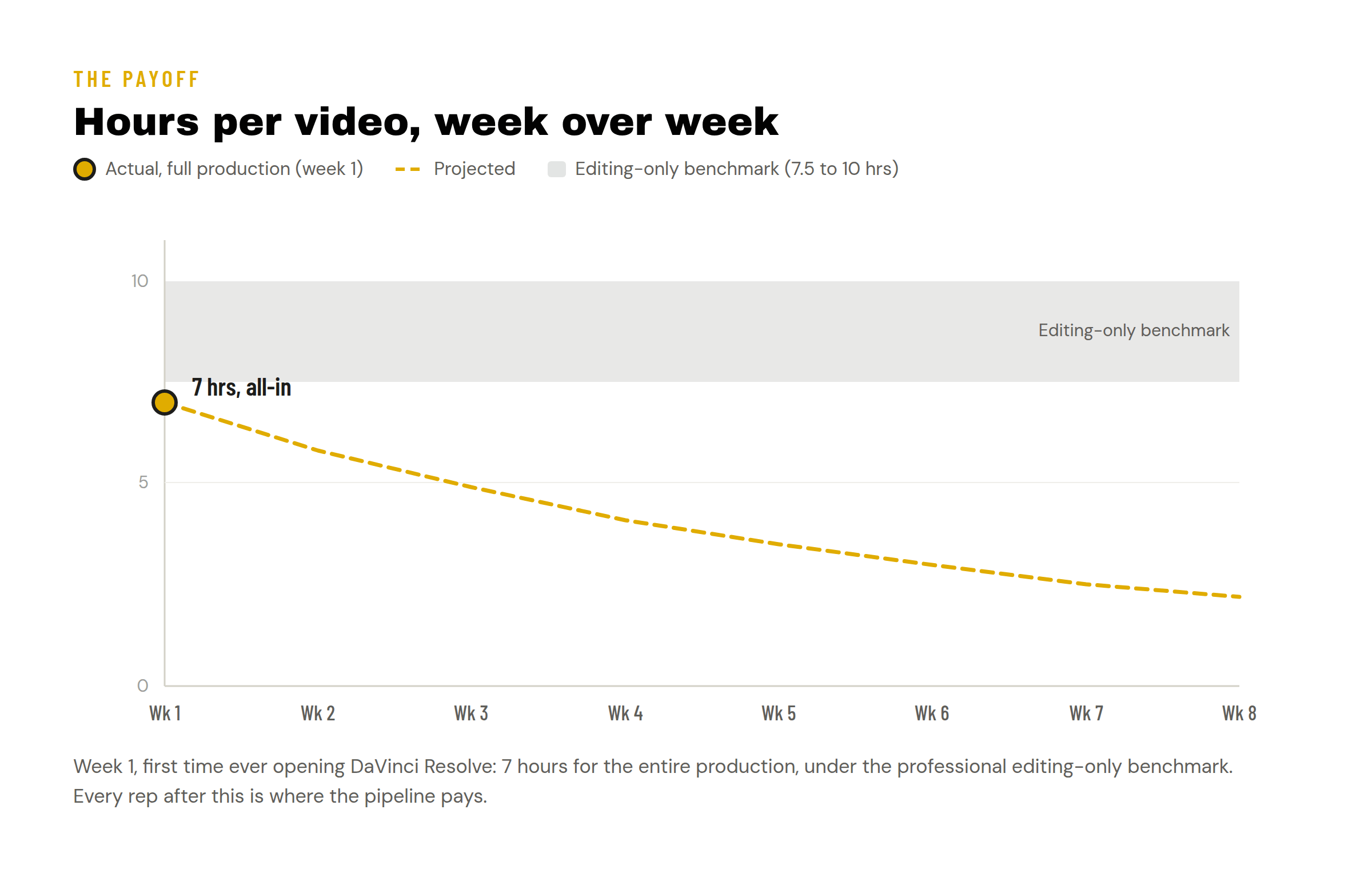
Seven hours. That’s what it took me to make a ten minute video this week, on a tool I’d never opened before Monday. For context, the professional benchmark is 45 to 60 minutes of editing per finished minute, which means a ten minute video is 7.5 to 10 hours of editing before you’ve filmed a single frame [1]. My seven hours covered everything: filming, A roll, B roll, photos, and the edit.
Here’s what this post covers: the problem (making videos solo takes too long and I was doing it the hard way), what I learned (a pipeline mindset plus a new editing tool got me under the industry editing benchmark in week one, with production included), and the way forward (why every week from here should get faster).
The problem
The math above is the wall every solo creator hits: the work is doable once, but not repeatable at a pace that builds anything.
My version of the problem had a second layer. I was over engineering. Too many connected tools, too many systems, too much ambition for one week. And there’s a tempting shortcut everywhere you look: AI can run a faceless content channel for you now, no face, no thoughts, no you. You can do it. I’m not going to. It just feels wrong to me. We’re people, and I want to talk to people. So the constraint I set for myself: AI helps me go faster, it doesn’t get to be me.
The learning
The fix wasn’t a tool. It was treating content like a pipeline. I was a product manager for CI/CD and I’m a PMP, so this is home turf: correlate work to stages, test it, put quality gates around it before you let it rip. It’s the writing process. It’s the scientific method. The prompt is your first draft; the revisions are still on you.
Here’s the pipeline I ran this week:
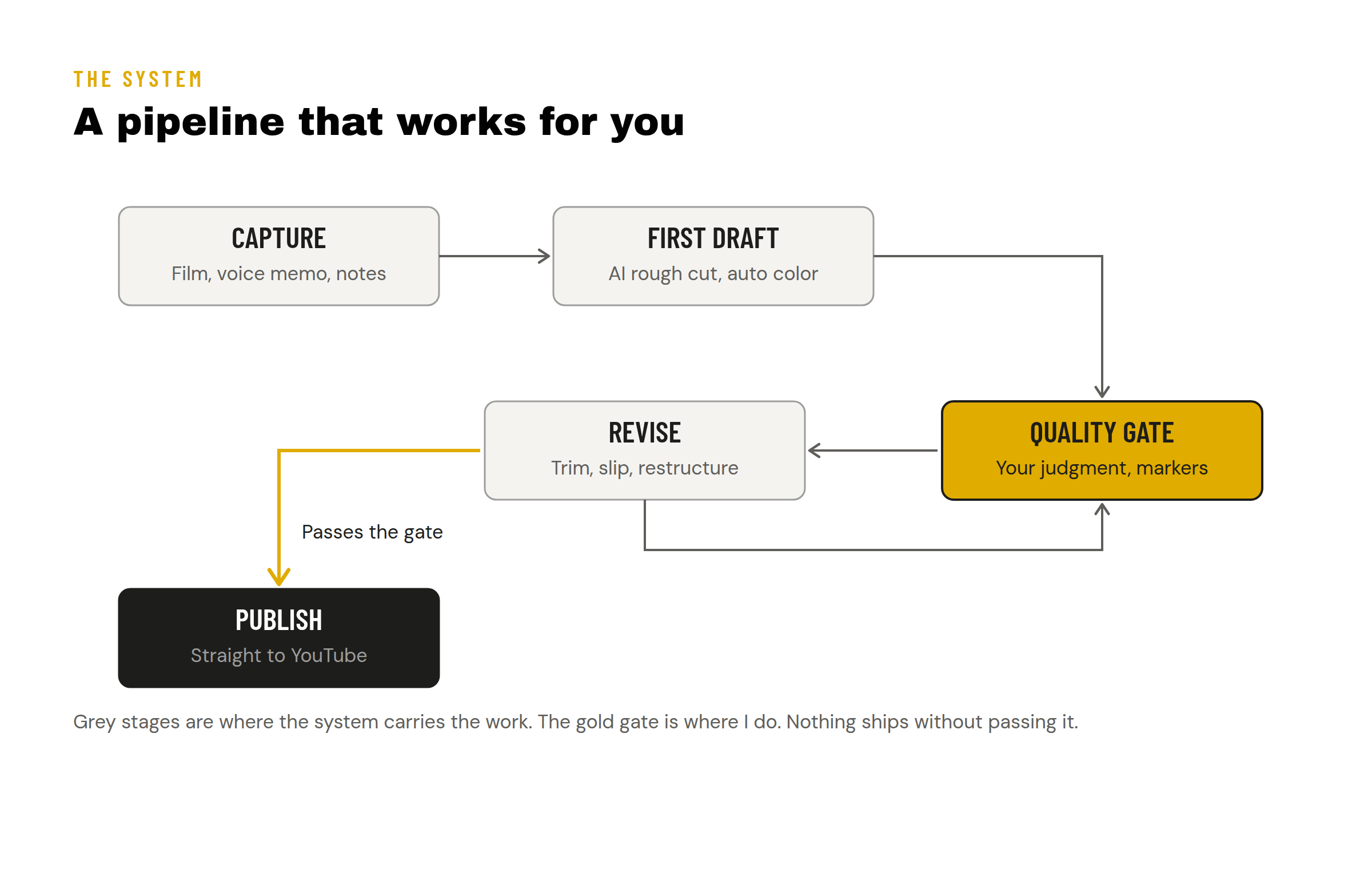
The tool that made the pipeline real was DaVinci Resolve [2], which now ships AI tooling that can rough in a first draft of your edit. I’m a Final Cut Pro guy, not a master but comfortable, and I had never opened Resolve before Monday. What made it click, fast:
Keyboard shortcuts map almost exactly to Final Cut. Command Shift Bracket for ripple trims, Command B for blade. Your muscle memory transfers.
Slip trims. T then S, then comma and period to slide content inside the clip. Small thing, huge time saver.
Markers are your best friend. The aha moment. Color, title, notes, keywords on every marker. I built a tag system: one color for cuts, one for reusable clips, one for “doesn’t fit the story yet.” My timeline became readable at a glance.
Auto Color across the whole timeline. Select all, apply, move on.
Publish straight to YouTube from inside Resolve. No YouTube Studio step. Final Cut doesn’t have this. Win.
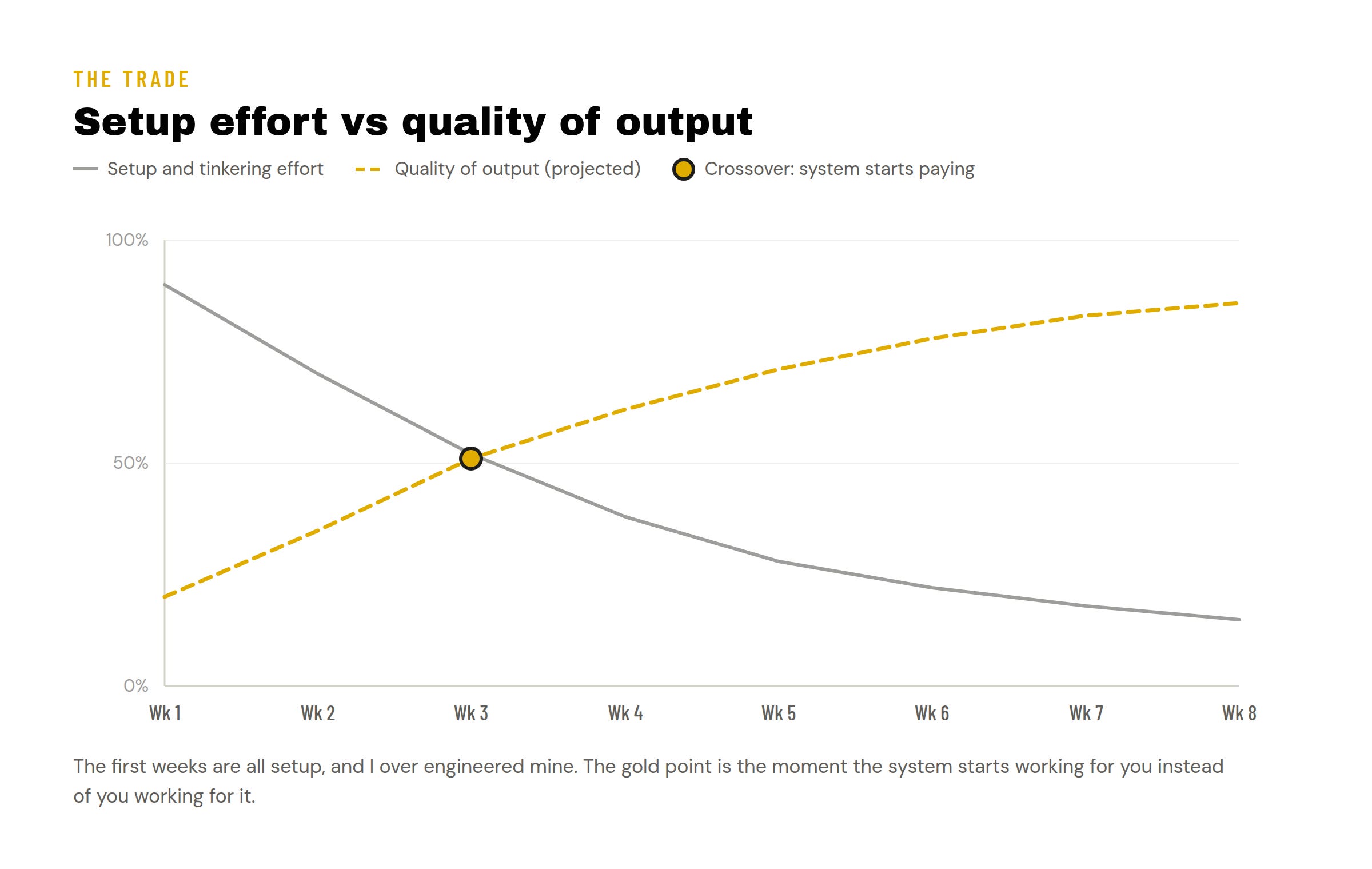
Two editing sessions, three and a half hours each, video done. But here’s the honest shape of the week: the setup cost was real, and I paid extra for over engineering it.
The way forward
Seven hours, week one, all-in, on a tool I’d never touched, against a 7.5 to 10 hour editing-only benchmark. That’s not the win. That’s the baseline. The whole point of building a pipeline instead of just grinding is that reps compound: the shortcuts are in my hands now, the marker system is built, the publish step is one click. Next week doesn’t start from zero, it starts from here.
Concrete fixes going into next week: shoot B roll deliberately instead of remembering at the end, keep the posting model running (a marketing video my wife shared frames every post as one of four types: attraction, nurture, conversion, or connection, so a Short early in the week to invoke a response, then two or three posts from my own ideas), and stop adding tools until the current ones are boring.
What I told you
The problem was speed and over engineering. The learning was that a pipeline with one human quality gate beats both grinding and going faceless: my full production came in under the editing-only benchmark in week one on a brand new tool. The way forward is reps, because a system you’ve paid the setup cost on only gets cheaper to run. Next week: faster.
References
[1] Veedyou, “How Long Does It Take to Edit a Video?” — https://www.veedyou.com/how-long-does-it-take-to-edit-a-video/
[2] Blackmagic Design, DaVinci Resolve — https://www.blackmagicdesign.com/products/davinciresolve